How big does a QR code need to be? Print sizes that actually work
Everyone says 2 cm. That number is right about half the time. Two quick checks give you the real minimum for your print job, before the file goes out.
Search for the minimum QR code size for print and you get one number back: 2 centimeters, about 0.8 inches. It is a fine number. It is also right about half the time.
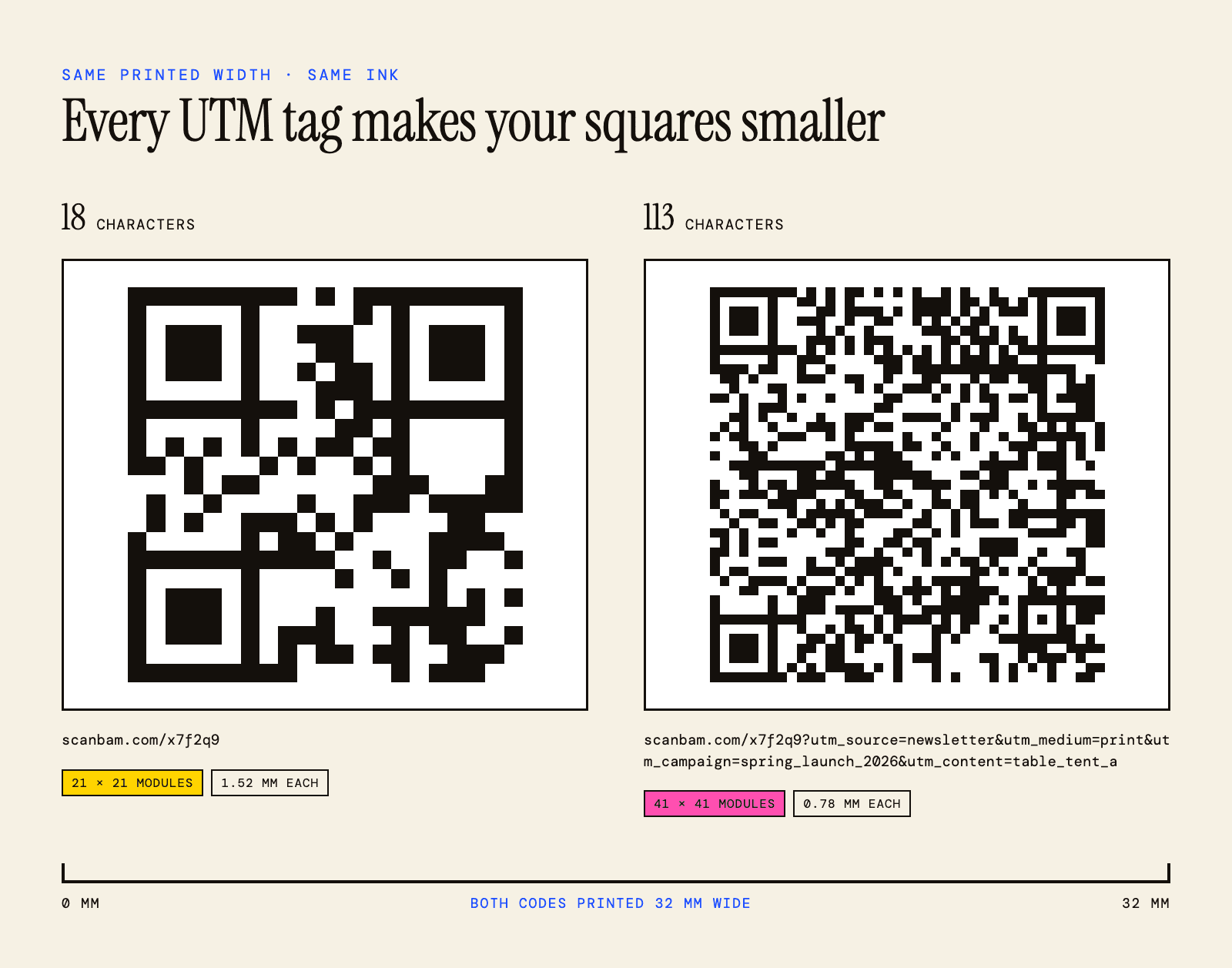
Here is what that number leaves out. Two QR codes at the exact same size can behave completely differently, because one holds a short link and the other holds a long one. The long one packs in more little squares. Smaller squares. Your printer smudges them together and your camera gives up.
So the real answer is not a number. It is two checks that take about a minute.
Check one: how far away will people stand?
This is the easy one, and it sets your floor.
The rule people use is 10 to 1. Whatever distance someone scans from, the code needs to be at least a tenth of that wide.
Scan from 25 cm away, at arm's length over a table, and you need 2.5 cm. Scan from 2 meters across a shop, and you need 20 cm. It scales in a straight line, which makes it easy to sanity check a poster before it goes to print.
| Where it goes | Scanned from | Minimum width |
|---|---|---|
| Business card | 20 to 25 cm | 2.5 cm / 1 in |
| Menu, table tent, flyer | 30 cm | 3 cm / 1.2 in |
| Product label, packaging | 20 cm | 2 cm / 0.8 in |
| Poster in a window | 1.5 m | 15 cm / 6 in |
| A-frame sign on the sidewalk | 2 m | 20 cm / 8 in |
| Billboard | 10 m | 1 m / 40 in |
One thing to know about this rule. It is not in the ISO standard for QR codes. It is a practical guideline that print shops and code vendors settled on because it works, not a law of physics. Treat it as a floor to clear, not a target to hit exactly. If you have room, go bigger.
Check two: how big are the little squares?
Now the part nobody puts in the size table.
A QR code is a grid of small squares. The industry calls them modules. Your phone camera has to see each one as its own dot. When they get too small, camera blur and ink spread on paper merge them together and the code fails.
The number of squares in that grid is not fixed. It depends on how much you encoded.
A short link like scanbam.com/menu fits in a 29 by 29 grid
A normal link with a page path needs 37 by 37
Add UTM tracking tags and you are at 45 by 45 or more
A vCard with a name, phone, email and address can push past 57 by 57
Same printed size, twice as many squares, each square half as wide. That is the whole reason two codes at 2 cm can behave so differently.
The floor most printers work to is 0.4 mm per square. Below that, fine detail starts dropping out on the press and cheap phone cameras start guessing.
So the math is:
(squares across + 8) x 0.4 mm = your minimum width
The plus 8 is the empty margin, four squares on each side, which is part of the code whether you like it or not. More on that below.
Run that for the common grid sizes and you get:
| Grid size | What fits | Minimum at 0.4 mm |
|---|---|---|
| 25 x 25 | A very short link | 13 mm |
| 29 x 29 | Short link, about 40 characters | 15 mm |
| 37 x 37 | Normal link, about 80 characters | 18 mm |
| 45 x 45 | Link with tracking tags | 21 mm |
| 57 x 57 | Long link or a vCard | 26 mm |
Look at what happens at the bottom of that table. A dense code at 2 cm is already under the floor. That is the code that scans fine on your monitor, scans fine on the proof, and then fails on 500 flyers.
The easiest fix is a shorter link
Before you make the code bigger, make the link shorter. It is free and it works better than any other lever you have.
Cut a link from 90 characters down to 25 and you can drop two grid sizes. That buys you real millimeters back, or it lets you keep the same size with fatter, more forgiving squares.
Ways to shorten that cost nothing:
Point at your homepage instead of a deep page, then handle the rest on the site
Drop the https:// and the www., since phones add them back
Set up a short redirect on your own domain, so yoursite.com/m sends people to the real page
Skip the UTM tags on print and use a dedicated short link instead, so you can still count the scans
That last one matters if you care about tracking. You do not have to give it up. You just should not carry it inside the code as raw text.
Your printer changes the answer
The 0.4 mm floor assumes decent print on decent paper. Not every job is that.
Office laser and good digital print at 300 dpi. The floor holds. This is the normal case.
Uncoated or recycled stock. Ink spreads into the fibers and the black squares grow into the white ones. Add 20 percent to your size and stop worrying about it.
Thermal receipt printers. Low resolution, and the paper is fuzzy. Go to 0.5 mm per square, which means a normal link needs about 25 mm, not 18.
Large format, banners and signage. These often print at 150 dpi or lower. The size you need from the 10 to 1 rule usually covers this anyway, since these are scanned from far away.
Fabric, embroidery, engraving, anything textured. Treat every number here as a starting point and test the real material. Weave and grain do things to edges that no formula predicts.
Dark or colored stock. Size will not save you here. This is a contrast problem, and we wrote about it in why QR codes fail on paper. The same goes for a colored code on white: if you are picking brand colors, check which QR code colors actually scan before you worry about millimeters.
The white border counts as part of the size
The empty margin around the code is not decoration. Scanners use it to find where the code starts and stops. The spec asks for four squares of empty space on every side.
Which means the 2.5 cm you reserved in your layout is not 2.5 cm of code. It is roughly 2 cm of code plus margin. If your designer crops that white to make things line up, or slides a caption right up against the edge, the code just got smaller than you think.
Measure the whole square including the white. That is the number that has to clear both checks. If you want the full rules for that margin, and what breaks when it is too thin, read our guide to the QR code quiet zone.
Bigger is not always safer
Worth knowing before you print a code the size of a door.
Phone cameras have a minimum focus distance. Stand too close to a very large code and the camera cannot focus on it or cannot fit it in frame. People then back up, which usually solves it, but on a wall in a narrow corridor there may be nowhere to back up to.
So size for the distance people will actually stand at, not for the biggest number you can fit. A 30 cm code on a wall someone walks past at 50 cm is a worse choice than a 10 cm one.
Test it before the print run, not after
Two minutes, and it catches almost everything.
Print the page at 100 percent scale on the actual printer. Not scaled to fit, and not on the good paper if the job is going on cheap paper.
Scan it from the distance people will really be at. Sitting at the table, standing at the sign.
Do it with the oldest phone in the building. Yours is probably too good to fail.
Do it in the light of the room it will live in. Dim restaurants are harder than your desk.
If it hesitates for more than a second, it is too small. Hesitation on a test sheet becomes failure on a folded, coffee-stained menu. Go up 20 percent and test again.
If it fails and you want to work out which part broke, the full checklist for a code that will not scan walks through it.
The short version
Run both checks and take the bigger number.
Distance divided by 10. Then squares across plus 8, times 0.4 mm. Whichever is larger is your minimum, and 20 percent above it is where you actually want to be.
For most small print jobs, a short link at 2.5 cm covers you. If your link is long, or the paper is cheap, or the light is bad, you need more than that. And 2 cm is not a rule. It is just the number that happens to work for a short link on good paper.
See the size before you print it.
scanbam checks contrast, margin and size before you download, so the code you send to print is one that reads.
Open the generatorWhere these numbers come from
The grid sizes and the four-square margin are from the QR code specification, ISO/IEC 18004, and Denso Wave's published documentation. The 10 to 1 rule and the 0.4 mm floor are not in the standard. They are practical guidelines used across the print industry, and we have labeled them that way on purpose. Nobody should quote them as law.
Common questions about QR code size
What is the minimum QR code size for print?
About 2 cm for a short link on good paper, scanned from arm's length. But it depends on your link. A long link with tracking tags needs 2.5 to 3 cm at the same scan distance, because the squares inside the code get smaller.
How small can a QR code be?
The smallest standard QR code is a 21 by 21 grid, which holds about 17 characters. At the 0.4 mm print floor, plus the white margin, that comes to roughly 12 mm. It only works with a very short link, sharp print and a phone held close. There is also a smaller format called Micro QR, but most phone cameras do not read it, so it is not an option for anything a customer scans.
Can a QR code be 1 cm?
Only for a very short link, printed sharply, scanned up close with a good camera. It clears the spec but not real conditions. For anything a customer will scan, 2 cm is the sensible floor.
How big should a QR code be on a business card?
2.5 cm by 2.5 cm, including the white margin around it. That covers a normal link at the 20 to 25 cm most people hold a card at. Do not go below 2 cm to make the layout work.
How big should a QR code be on a poster?
Divide the distance people will stand at by 10. A poster read from 1.5 meters needs a code about 15 cm wide. A sign read from across a room needs more.
Does a bigger QR code always scan better?
Up to a point. Beyond it, phone cameras cannot focus if someone stands too close, and very large codes on a wall people pass at close range can be harder to scan than smaller ones. Size for the real viewing distance.